Designing a Bulletproof Backup & Restore System for PowerDNS with LMDB Views on FreeBSD

In my previous post, I detailed how a silent dependency upgrade from LMDB 0.9.x to LMDB 1.0 can completely break a PowerDNS Authoritative Server installation due to on-disk format incompatibility.
While upgrading binaries is simple, the real challenge lies in protecting your data. If you are leveraging PowerDNS Views (for example, to separate internal telecom core network zones like gprs or 3gppnetwork from public ones), standard database file backups won't cut it during major backend migrations.
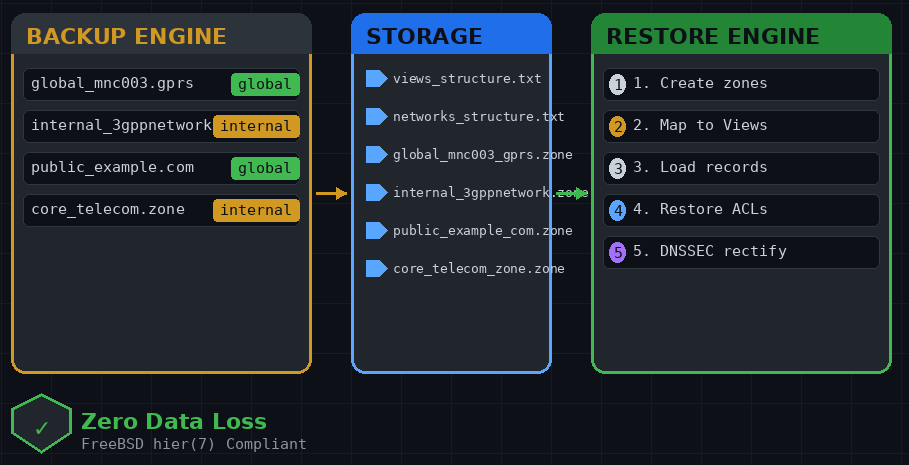
To ensure absolute peace of mind, we need a solution that exports everything into human-readable, database-agnostic BIND Zone Files, while explicitly preserving the metadata mapping of which zone belongs to which DNS View.
Here is how to build a production-ready backup and recovery system that strictly adheres to the standard FreeBSD filesystem hierarchy.
FreeBSD Filesystem Architecture
Following the conventions laid out in the FreeBSD hier(7) manual, our system layout will be structured as follows:
- Automation Scripts: Placed in
/usr/local/bin/so they are available system-wide. - Backup Storage: Placed under
/var/backups/powerdns/to keep the volatile data separate from application binaries.
Let's initialize the storage directory structure:
mkdir -p /var/backups/powerdns/zones_dump1. The Backup Engine (/usr/local/bin/pdns-backup.sh)
This script extracts every single zone present on the system. Because PowerDNS doesn't have a direct "show view for this zone" command, the script dynamically cross-references each zone against all existing views. If a zone is part of a view, it's flagged accordingly; if not, it's categorized as a global zone.
Run this command in your shell to deploy the backup script:
cat > /usr/local/bin/pdns-backup.sh << 'EOF'
#!/bin/sh

# ==============================================================================
# PowerDNS Full Automated Backup Script (Networks, Views & Global Zones)
# Optimized for FreeBSD Filesystem Hierarchy
# ==============================================================================

BACKUP_DIR="/var/backups/powerdns"
ZONES_DIR="$BACKUP_DIR/zones_dump"
META_FILE="$BACKUP_DIR/views_structure.txt"
NET_FILE="$BACKUP_DIR/networks_structure.txt"

# Ensure backup directories exist
mkdir -p "$ZONES_DIR"

# Clean up previous dumps safely
rm -f "$ZONES_DIR"/*.zone
rm -f "$META_FILE" "$NET_FILE"

echo "=== Starting FULL PowerDNS Backup [$(date)] ==="

# 1. Export Network-to-View mappings (ACLs)
echo "  -> Exporting network definitions..."
pdnsutil network list > "$NET_FILE"

# 2. Export Zones
ALL_ZONES=$(pdnsutil zone list-all)

for zone in $ALL_ZONES; do
    ASSIGNED_VIEW="global"

    for view in $(pdnsutil view list-all); do
        pdnsutil view list "$view" | grep -Fqx "$zone"
        if [ $? -eq 0 ]; then
            ASSIGNED_VIEW="$view"
            break
        fi
    done

    echo "  -> Exporting zone: $zone ($ASSIGNED_VIEW)"

    SAFE_ZONE_NAME=$(echo "$zone" | tr '.' '_')
    FILE_NAME="${ASSIGNED_VIEW}_${SAFE_ZONE_NAME}.zone"

    echo "${ASSIGNED_VIEW}:${zone}" >> "$META_FILE"
    pdnsutil zone list "$zone" > "$ZONES_DIR/$FILE_NAME"
done

echo "=== Backup completed successfully! ==="
EOF
chmod +x /usr/local/bin/pdns-backup.sh
2. The Restore Engine (/usr/local/bin/pdns-restore.sh)
The recovery script does the heavy lifting in reverse. It reads the metadata file line by line, provisions the bare zones if they don't exist, maps the view-specific zones back to their respective PowerDNS Views (while keeping global zones untouched), populates the records, and forces a DNSSEC rectification.
Run this command to deploy the recovery script:
cat > /usr/local/bin/pdns-restore.sh << 'EOF'
#!/bin/sh

# ==============================================================================
# PowerDNS Full Automated Restore Script (Networks, Views & Global Zones)
# Optimized for FreeBSD Filesystem Hierarchy
# ==============================================================================

BACKUP_DIR="/var/backups/powerdns"
ZONES_DIR="$BACKUP_DIR/zones_dump"
META_FILE="$BACKUP_DIR/views_structure.txt"
NET_FILE="$BACKUP_DIR/networks_structure.txt"

if [ ! -f "$META_FILE" ]; then
    echo "Error: Metadata structure file $META_FILE does not exist!"
    exit 1
fi

echo "=== Starting Full Restore [$(date)] ==="

# 1. Restore Network-to-View mappings
if [ -f "$NET_FILE" ]; then
    echo "Restoring Network View Definitions..."
    while read -r net view; do
        [ -z "$net" ] || [ -z "$view" ] && continue
        echo "  [+] Mapping network $net to View $view..."
        pdnsutil network set "$net" "$view"
    done < "$NET_FILE"
fi

# 2. Restore Zones
while IFS=":" read -r view zone
do
    [ -z "$view" ] && continue

    SAFE_ZONE_NAME=$(echo "$zone" | tr '.' '_')
    ZONE_FILE="$ZONES_DIR/${view}_${SAFE_ZONE_NAME}.zone"

    if [ ! -f "$ZONE_FILE" ]; then
        echo "Warning: Zone file for $zone ($ZONE_FILE) is missing. Skipping."
        continue
    fi

    echo "Restoring $zone ($view)..."

    pdnsutil zone show "$zone" >/dev/null 2>&1
    if [ $? -ne 0 ]; then
        echo "  [+] Creating zone baseline $zone..."
        pdnsutil zone create "$zone"
    fi

    if [ "$view" != "global" ]; then
        echo "  [+] Mapping $zone to View: $view..."
        pdnsutil view add-zone "$view" "$zone" 2>/dev/null
    fi

    echo "  [+] Loading resource records..."
    pdnsutil zone load "$zone" "$ZONE_FILE"

done < "$META_FILE"

echo "=== Rectifying all zones for DNSSEC compliance... ==="
pdnsutil zone rectify-all quiet

echo "=== Restore completed successfully! ==="
EOF
chmod +x /usr/local/bin/pdns-restore.sh
Verifying the Setup
Running pdns-backup.sh creates a predictable, clean snapshot. Your output folder /var/backups/powerdns/zones_dump/ will look like this:
global_72_137_82_in-addr_arpa.zone
global_epc_mnc003_mcc284_3gppnetwork_org.zone
global_mnc003_mcc284_gprs.zone
internal_epc_mnc003_mcc284_3gppnetwork_org__internal.zone
internal_mnc003_mcc284_gprs__internal.zone
And your views_structure.txt maps the precise relations:
global:mnc003.mcc284.gprs
internal:mnc003.mcc284.gprs..internal
Additionally, the new backup engine will produce a `networks_structure.txt` file, preserving the subnets mapped to their respective views:```text10.127.0.0/16 internalThe Core Link: Backing Up Network Mappings (ACLs)
This highlights a critical architectural shift in modern PowerDNS releases. In traditional DNS servers like BIND, the Access Control Lists (ACLs) that dictate which subnets land on which view are defined within flat configuration files. However, PowerDNS with the LMDB backend treats network routing rules as first-class citizens inside the database itself.
Using pdnsutil, these mappings are queried and modified via the network command group:
pdnsutil network list— Lists all subnets linked to their respective views.pdnsutil network set NET VIEW— Maps a subnet to a specific view inside the database.
During my actual migration on the telecom testbed, I hit the exact pain point of omitting the file networks_structure.txt. After wiping the old LMDB binaries and restoring the zone data, internal core network infrastructure components suddenly lost access to their internal views. The mapping telling PowerDNS that the 10.XXX.0.0/16 subnet belonged to the internal view had been completely wiped out along with the old database file.
Conclusion
By isolating the data layer into plain text BIND files, you eliminate any dependency on the underlying database engine's file format. Whether you are recovering from a corrupt LMDB file, migrating storage backends, or doing a major software version hop, running pdns-restore.sh will rehydrate your entire DNS infrastructure—views and all—in just a few seconds.